



.png)







Exec+ member and #proud
We’re thrilled to hear you’re an Exec+ member!
Now’s the time to shout from the rooftops and showcase your marketing credentials with your network.
Adding details of your membership to your profile will:
- Showcase your extensive marketing knowledge
- Highlight your acumen across a variety of marketing principles
- Demonstrate your appetite to enhance your knowledge and develop your career
- Improve appeal amongst recruiters seeking applicants with licenses/certifications.
Sounds good, right? Here’s how you can flaunt your status as an Exec+ member:
1. Head to your LinkedIn profile
Head to the ‘Experience’ section of your profile and hit the + button located in the top right corner.
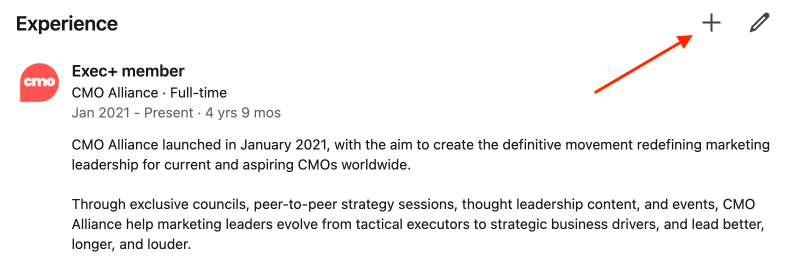
2. Provide some quick details
Then, you’ll be presented with this box:
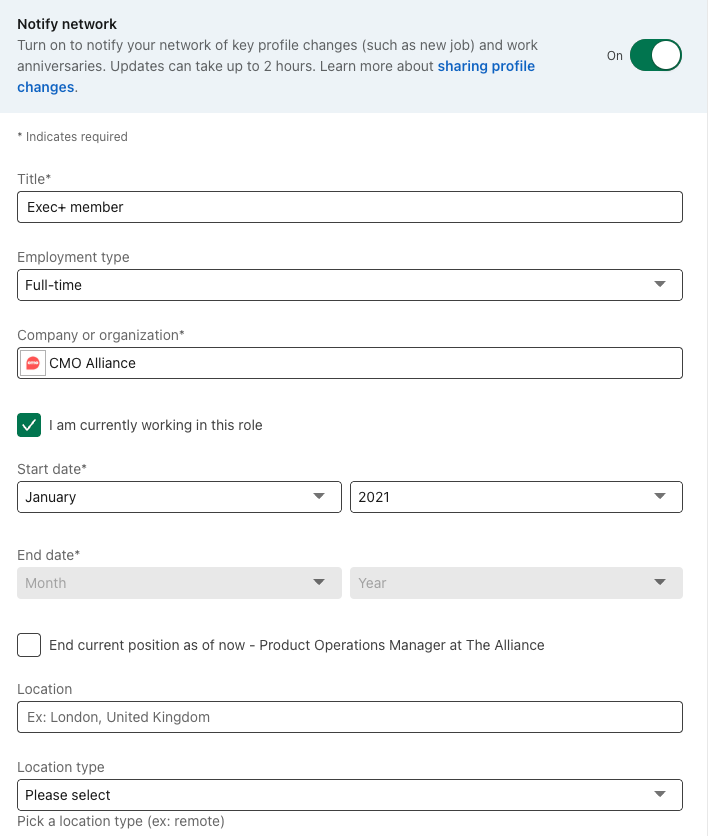
Title: Exec+ member
Employment type: your choice
Company: CMO Alliance
Location: N/A
Date: the date you became an Exec+ member
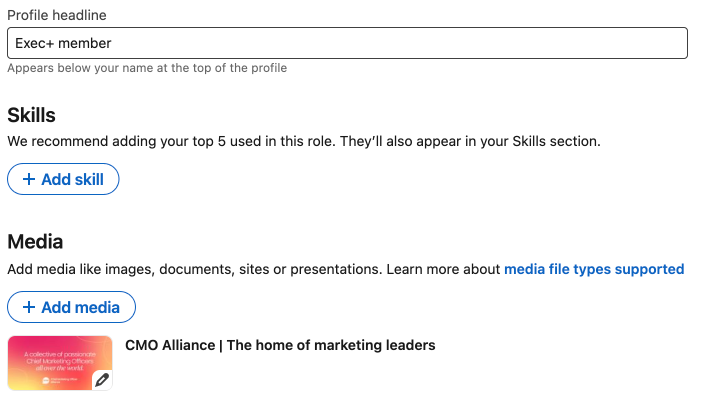
A little further down the page, there’ll then be some additional information you’ll need to provide.
Headline: Add 'Exec+ member'
Last (but by no means least!) click ‘Add Media’, ‘Add a Link’ and insert this URL.
3. Admire the view!
Once you’ve completed these steps, your Exec+ member status will be added to the experience section of your profile.
P.s. Remember, be sure to use your affiliate link to make some extra $$$ from every member who becomes a Exec+ member via your LinkedIn profile. 😉

